Webrtc
WebRTC Quick Start
Quick start guide to integrate WebRTC into your website
Quick Start
Create HTML file
Begin by creating html file and add the usual content to it.
<!DOCTYPE html>
<html lang="en">
  <head>
    <meta charset="UTF-8" />
    <meta name="viewport" content="width=device-width, initial-scale=1.0" />
    <title>your amazing app</title>
  </head>
  <body></body>
</html>
Add CDN of InnocallsRTC
Then add the necessary script to your HTML file.
<!DOCTYPE html>
<html lang="en">
  <head>
    ... ...
    <title>your amazing app</title>
  </head>
  <body></body>
  ...
  <script
    type="module"
    src="https://innocalls-statics.s3.ap-south-1.amazonaws.com/webrtc/webrtc.js"
  ></script>
  ...
</html>
Then add the necessary script to your HTML file.
<!DOCTYPE html>
<html lang="en">
  <head>
    ... ...
    <title>your amazing app</title>
  </head>
  <body></body>
  ...
  <script
    type="module"
    src="https://innocalls-statics.s3.ap-south-1.amazonaws.com/webrtc/v2/webrtc.js"
  ></script>
  ...
</html>
Optional Add Stylesheet of InnocallsRTC
Next add stylesheet tag to your HTML file.
<!DOCTYPE html>
<html lang="en">
  <head>
    ...
    <link
      rel="stylesheet"
      href="https://innocalls-statics.s3.ap-south-1.amazonaws.com/webrtc/style.css"
    />
    ...
    <title>your amazing app</title>
  </head>
  <body></body>
  ...
</html><!DOCTYPE html>
<html lang="en">
<head>
...
<link
rel="stylesheet"
href="https://innocalls-statics.s3.ap-south-1.amazonaws.com/webrtc/v2/style.css"
/>
...
<title>your amazing app</title>
</head>
<body></body>
...
</html>Create parent element
Create parent element to mount the component into and add a unique id (works with any selector) to it
<!DOCTYPE html>
<html lang="en">
  <head>
    ...
    <title>your amazing app</title>
  </head>
  <body>
    <div id="root"></div>
  </body>
  ...
</html>
Mount InnocallsRTC
Finally you need to mount InnocallsRTC into the div you've just created.
<!DOCTYPE html>
<html lang="en">
  <head>
    ...
    <title>your amazing app</title>
  </head>
  <body>
    <div id="root"></div>
  </body>
  ...
  <script type="module">
    // Initialize InnocallsRTC with configuration options
    const innocallsRTC = new InnocallsRTC({
      apiKey: 'YOUR_API_KEY', // Your API key generated from Innocalls dashboard
      extension: 'YOUR_EXTENSION_NUMBER', // Your extension number for login
      webrtcSecret: 'EXTENSION_WEB_RTC_SECRET', // WebRTC secret of your extension
      config: {
        baseColor: '#333', // Customize base color to match your amazing website
      },
      terminateOnRefresh: true, // Default is true. If set to true, any ongoing call will be automatically terminated when the page is refreshed or reloaded. If set to false, you will need to manually handle call termination before page reloads.
    })

    // Mount Dialpad to specified html element
    innocallsRTC.mount('#root') // Mounts the Dialpad to the element with id="root"
  </script>
</html>
Final file
Here is a final html file.
Note: Make sure to use the correct CDN links for your version:
- Script: See the Add CDN of InnocallsRTC section above
- Stylesheet: See the Add Stylesheet of InnocallsRTC section above
<!DOCTYPE html>
<html lang="en">
  <head>
    <title>your amazing app</title>
    <!-- For v1: use /webrtc/style.css -->
    <!-- For v2: use /webrtc/v2/style.css -->
    <link
      rel="stylesheet"
      href="https://innocalls-statics.s3.ap-south-1.amazonaws.com/webrtc/style.css"
    />
  </head>
  <body>
    <div id="root"></div>
  </body>
  <!-- For v1: use /webrtc/webrtc.js -->
  <!-- For v2: use /webrtc/v2/webrtc.js -->
  <script
    type="module"
    src="https://innocalls-statics.s3.ap-south-1.amazonaws.com/webrtc/webrtc.js"
  ></script>
  <script type="module">
    // Initialize InnocallsRTC with configuration options
    const innocallsRTC = new InnocallsRTC({
      apiKey: 'YOUR_API_KEY', // Your API key generated from Innocalls dashboard
      extension: 'YOUR_EXTENSION_NUMBER', // Your extension number for login
      webrtcSecret: 'EXTENSION_WEB_RTC_SECRET', // WebRTC secret of your extension
      config: {
        baseColor: '#333', // Customize base color to match your amazing website
      },
      terminateOnRefresh: true,
    })

    // Mount Dialpad to specified html element
    innocallsRTC.mount('#root') // Mounts the Dialpad to the element with id="root"
  </script>
</html>
Demo
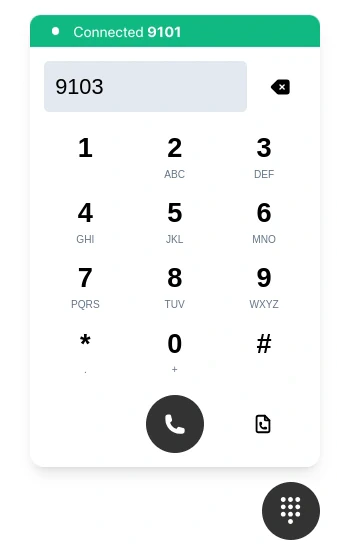
Then you have it - a fully configured WebRTC solution for your website!